

(re) Introducing Agent
New integrations, event-driven automations, webhook delivery, and an API.
Ask Macroscope Anything (AMA) has been part of Macroscope since launch day. It started as a chatbot that understood your codebase — hence the name. Ask it anything, get a grounded answer.
But AMA's capabilities kept growing. Code generation. PR creation. Full integration with your SDLC. At some point, it became much more than a tool for answering questions. It's an agent that takes actions and executes — on demand, on a schedule, and in reaction to events that happen anywhere in your workflow.
So we're dropping the "Ask" and calling it what it is: the Macroscope Agent. And it's got a bunch of new capabilities.
New integrations
The original AMA could search your codebase and query Slack. That was useful, but your codebase isn't the only place answers live. Production issues show up in Sentry. Usage patterns live in Amplitude. Feature rollout state lives in LaunchDarkly. Agent can now reach into all of them. This is also what makes context-aware code review possible: the same connections let Macroscope review a pull request against how your code actually behaves in production.








New integrations since our last update:
- Sentry: search issues, pull event details, list affected projects. When someone asks "what's causing the spike in 500s?", Agent can go look.
- Amplitude: query event segmentation, funnels, retention, and user activity. Ask Agent how a feature is performing and it pulls real usage data.
- GitHub API: read-only access to the full GitHub REST API. Pull request metadata, issue history, workflow runs, repository stats. Anything the API exposes, Agent can query.
- Image model generation: generate diagrams, architecture sketches, or visual explanations.
- Slack mentions: Agent responses can @mention teammates directly in Slack
- GCP Cloud Logging: query your production logs directly. Filter by service, severity, or time range, and Agent can surface patterns across thousands of log entries without you opening the console.
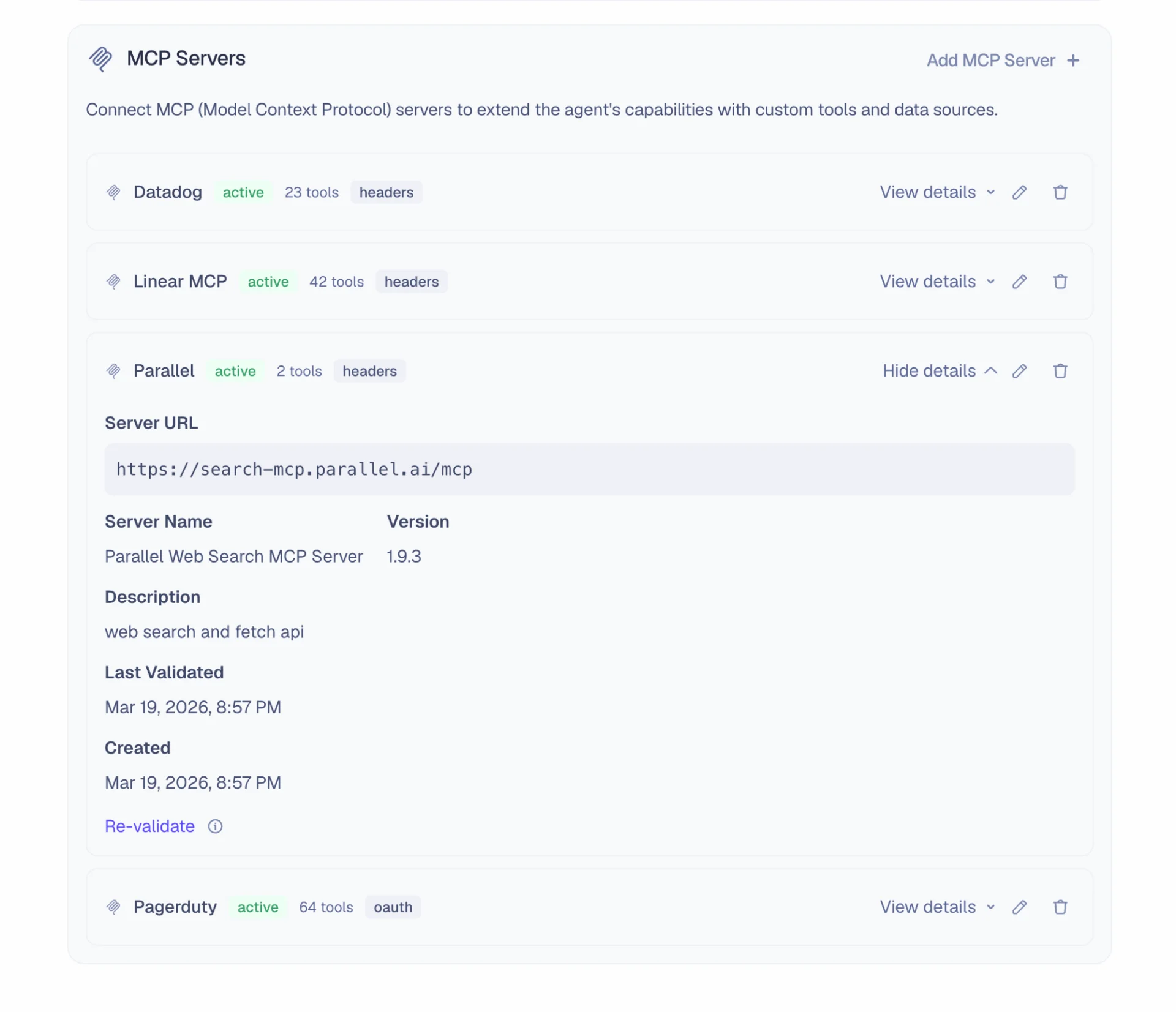
And finally: MCP connections. You can now connect Agent to MCP servers: your internal tools, third-party services, custom data sources. MCP connections support header-based and OAuth authentication, automatic tool discovery, and per-tool access controls. If it speaks MCP, Agent can use it.
Agent automations
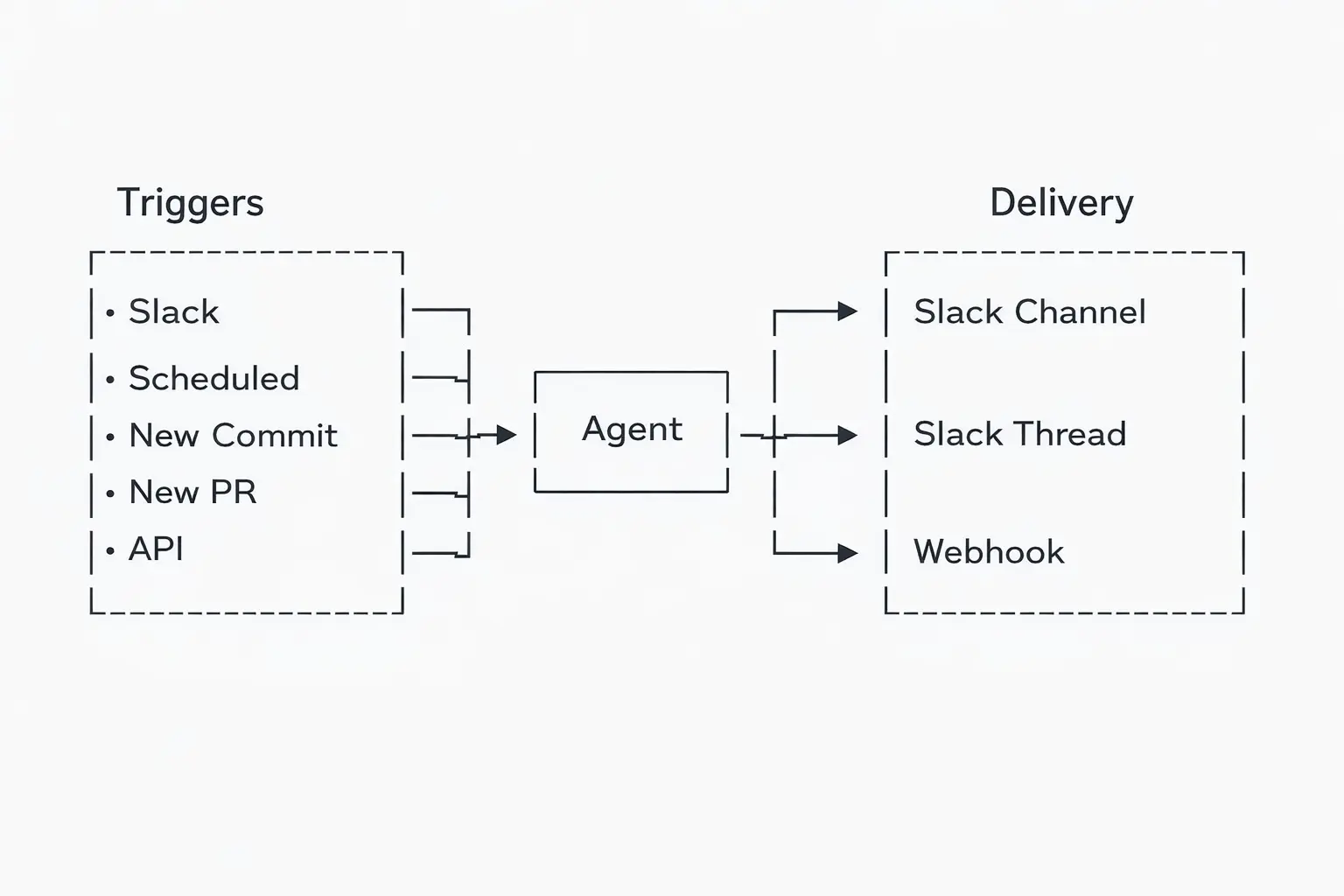
Agent doesn't just run on demand. It can be triggered through configurable automations called "Macros": workflows that trigger your Agent instructions on a recurring schedule. Today, we're expanding Macros to support triggering on new commits and new pull requests. These automatically receive context about the event that triggered them (e.g. commit or PR metadata), and can be configured to run only if certain filter conditions are met:
- Repo filter: only run for repos matching a glob pattern
- Branch filter: only run for commits to specific branches
Macros now support new delivery options. Previously, the results of a Macro could only be posted to a Slack channel. Now you can deliver to Slack threads (so responses land in context rather than a new message in the channel) or forward to a webhook URL for integration with your own systems. Webhook URLs are validated against a workspace allowlist at both configuration and execution time.
Agent API
We heard from customers that they wanted a way to trigger Agent programmatically from their own services. Enter webhooks.
Send a POST request with a query and a response destination, and Agent runs asynchronously and delivers the response to a Slack channel, a Slack thread, or a webhook URL.
curl -X POST "https://hooks.macroscope.com/api/v1/workspaces/{workspaceType}/{workspaceId}/query-agent-webhook-trigger" \
  -H "Content-Type: application/json" \
  -H "X-Webhook-Secret: <your-api-key>" \
  -d '{
    "query": "Summarize the last 24h of errors in the payments service",
    "responseDestination": {
      "slackChannelId": "C0123XXXXX",
      "slackThreadTs": "1234567890.XXXXXX"
    }
  }'
Or forward the response to a webhook instead:
curl -X POST "https://hooks.macroscope.com/api/v1/workspaces/{workspaceType}/{workspaceId}/query-agent-webhook-trigger" \
  -H "Content-Type: application/json" \
  -H "X-Webhook-Secret: <your-api-key>" \
  -d '{
    "query": "What changed in the payments service this week?",
    "responseDestination": {
      "webhookUrl": "https://your-app.com/api/macroscope-results"
    }
  }'
This turns Agent into a building block. Your CI pipeline, your incident management system, your internal tools — anything that can make an HTTP request can trigger Agent and get a response delivered wherever it's needed.
Use Cases
Here are a few use cases that we love:
Draft customer support responses. One of our favorite internal use cases. Pylon posts new customer issues to a Slack channel. A Zap picks them up and triggers Agent via webhook with the customer's question and issue metadata. Agent triages: if it's a bug, it root-causes it in the codebase and drafts a fix PR. If it's a product question, it researches the code and docs and drafts an answer. If it's a feature request, it scopes the work and creates a Linear issue with the implementation plan.
Daily production health sweeps. Schedule a macro that runs every morning. Agent queries your production logs (via GCP Cloud Logging), clusters the most frequent errors over the last 24h, identifies which services are affected, and drafts PRs to address the top issues.
Auto-fix Sentry errors. Whenever a Sentry error gets posted to our Slack alerts channel, Agent investigates the error, researches the codebase, and pushes a PR with the fix.
Getting started
These new Agent capabilities are now available for all Macroscope customers.
To set up event-triggered macros, visit the Macros page. To connect new integrations, go to Settings → Connections. Our Agent documentation covers each feature in detail, including Macros, integrations, and the API.
If you build something interesting with Agent, we'd love to hear about it. Reach out on Slack or email us at contact@macroscope.com.