
Introducing Fix It For Me
Delegate bug fixes directly to Macroscope: from code review comments to merged PRs, automatically.
Macroscope’s code review catches bugs other tools miss, with the best signal-to-noise ratio on the market. But finding bugs is only half the problem: fixing them still takes up valuable engineering time. Until now.
Fix It For Me lets you delegate fixes directly to Macroscope, seamlessly closing the loop on detected issues on your PRs without taking you out of your flow.
Less context switching, faster iteration, more time for architecture
AI coding and code review tools increase coding velocity and output, but also can increase the volume of PR comments to review and fixes to implement. Every comment becomes a context switch: stop what you’re doing, understand the problem, write the fix, push, wait for CI.
Fix It For Me closes that loop. Macroscope already understands your codebase well enough to find real runtime bugs that human reviewers and other code review tools often miss. Now it uses that same understanding to fix those bugs. This means:
- Less context switching. Delegate mechanical fixes without breaking flow.
- Faster iteration. Fixes ship immediately instead of queuing behind other work.
- More time for architecture. Human reviewers can focus on design decisions, not obvious errors or minor corrections.
How it works
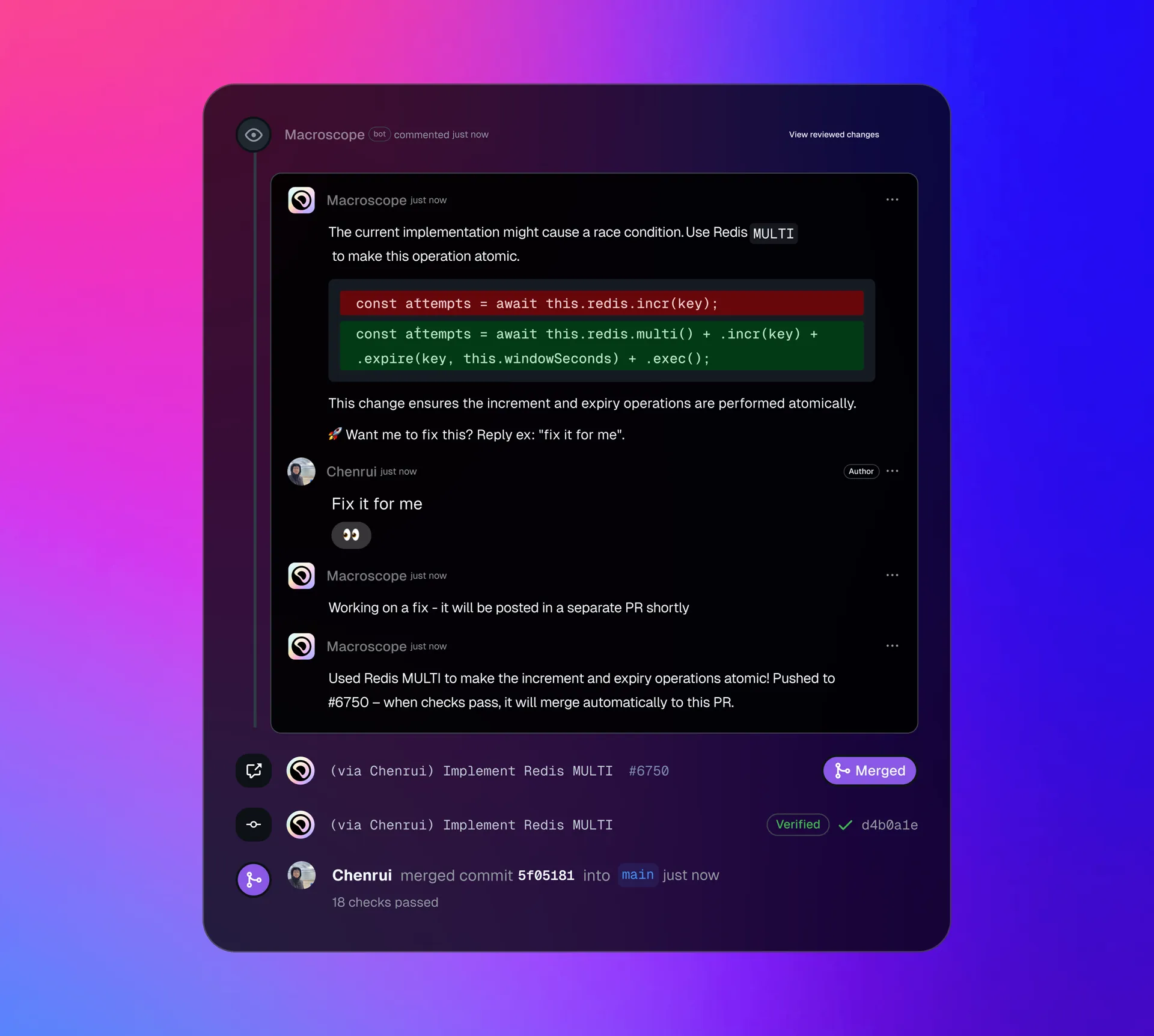
- Macroscope leaves a review comment on your PR with a suggested fix.
- The PR’s author replies to Macroscope giving the go ahead.
- Macroscope creates a branch, commits the fix(es), opens a PR against your feature branch, and merges it automatically after all checks / GitHub Actions succeed.
- If any CheckRuns or GitHub Actions fail with annotations, Macroscope will attempt to self-heal by addressing the issues with subsequent commits to its PR.
We've been testing Fix It For Me with a few beta customers already. They’ve found it especially helpful to delegate fixes after Macroscope surfaces high-quality review comments.
Configuration
Auto-merge is enabled by default. If the base of the PR is a feature branch, Macroscope will attempt to auto-merge the PR back to the base branch. This will only happen if you have the auto-merge Macroscope setting enabled and all checks pass. Any Macroscope PRs against your main development branch will always need to be manually merged.
You can disable auto-merge in your Account Settings at app.macroscope.com/settings. For full configuration options, see our documentation.
How is this different from GitHub's one click suggestions?
When Macroscope finds an issue during code review, it will include a one-click suggestion if it thinks:
- The suggested fix for the issue is entirely self contained (applying it can be done without changing things anywhere else in the code).
- The suggested fix for the issue spans lines added (since GitHub's one-click suggestion feature doesn't work on removed lines).
One click suggestions are entirely different from Macroscope's new "Fix It For Me" feature. Fix It For Me is a flexible process by which Macroscope writes code for you. You can provide open ended instructions directly from the PR and Macroscope will endeavor to fulfill them by writing code, pushing a branch, opening its own PR against your original one, and automatically merging the PR once checks clear and there are no remaining tasks.
Available Now
Fix It For Me is now available for everyone.